Logo
  • Solutions
  • Team
  • Resources
ERSTGESPRÄCH
A guide to create Notion formulas based on Select fields

A guide to create Notion formulas based on Select fields

Lecture
8 min
Author

Beli Löw

Published:
April 20, 2023
Updated:
April 20, 2023

← All Articles

image

Do you want to learn how to create a rating in Notion based on select fields? I will show you an example of how to create a database to prioritize ideas based on the PIE framework. Additionally, I have summarized 3 simple prioritization methods.

In this article, you will learn how to create the formula yourself. You can also download the template and customize it for yourself. However, I recommend going through the instructions so that you can learn it right away and use the knowledge for other use cases.

  • Step-by-step guide on how to evaluate select fields with a formula.
  • Step 1: Create a database with the properties
  • Step 3: Define your options and evaluation criteria.
  • Step 4: Formula for numerical value
  • Step 5: Formula for the rating in stars
  • Summary of creating a Notion formula
  • 3 simple prioritization frameworks
  • PIE Framework (Potential, Importance, Ease)
  • ICE Framework (Impact, Confidence, Effort)

Step-by-step guide on how to evaluate select fields with a formula.

image
image

Step 1: Create a database with the properties

First, create a database with the name "Ideas".

This example is created based on the PIE framework. Add the properties we need for it.

These can be expanded arbitrarily, for example, to include the status or a short description. For now, however, we focus on the most important fields for this calculation.

Create the following properties in your database:

  1. Potential Type = Select
  2. Importance Type = Select
  3. Ease Type = Select
  4. ★Bewertung Type = Formula
  5. #Bewertung Type = Formula

It will look like this:

image

Step 3: Define your options and evaluation criteria.

Please specify which options you want to use and which numerical value they are assigned to. In this example, we use "Very low" to "Very high" to make it easier.

image

Example:

Potential: Very high = 10

Potential: Very low = 0.1

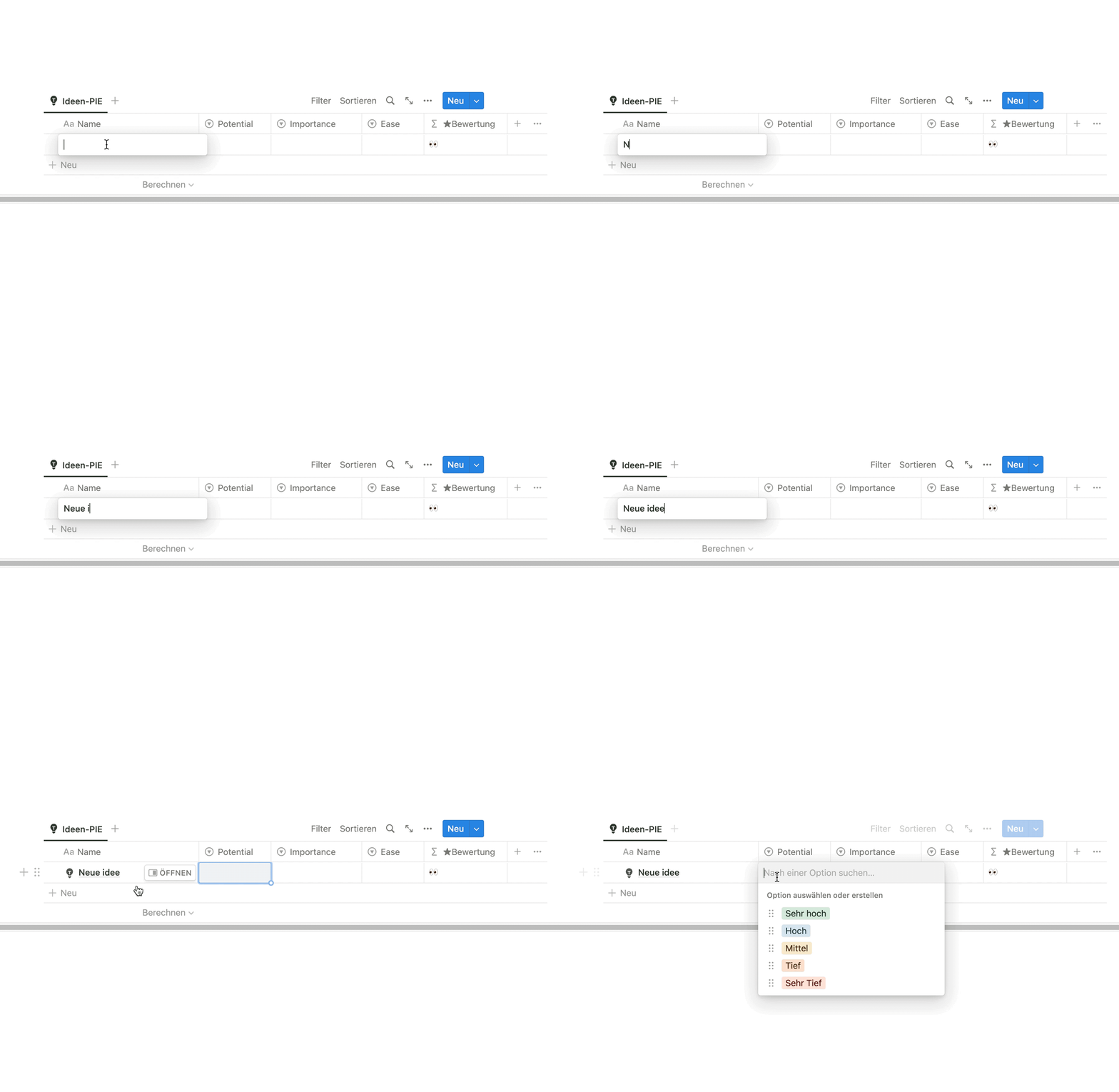
If you are sure, you can create these options in the select fields. So in the fields Potential, Importance, Ease.

image
Important:

If you rename an option in a select field, you must adjust this in the formula. The same applies if you rename the database property.

Step 4: Formula for numerical value

The numerical values we defined above should now be stored in a formula. This assignment is made in a formula that defines the property #Bewertung

image

Here you can adapt the formula to your definition. Tip: Use it as given first before adapting it.

prop(“Potential”) refers to the property in the database, in this example "Potential".

== "Sehr hoch", 10 defines the value of the option. In this example, Very high receives a 10.

It will look like this. But since this is hard to read, let alone edit, I use the above-mentioned workaround.

Step 5: Formula for the rating in stars

We use the numerical rating for sorting. The assignment of stars makes it easier for the eye to rate them.

image

This is what the rating with stars looks like.

Define which label should be displayed for which values. In this example, we use 3 stars. "👀" means that no rating has been given yet.

Value
0
<4
<6
<8
Else
Result
👀
☆☆☆
★☆☆
★★☆
★★★
0 (No value)
less than 4
less than 6
less than 8
Other value

This formula goes into the database property ★Bewertung.

It will look like this:

image

Summary of creating a Notion formula

By assigning values to the select options, we can calculate and create ratings. To better understand formulas, I recommend copying and formatting them into a Notion code block. Remember to always perform this step to remove the formatting before copying the formula into the browser address bar (as described above).

3 simple prioritization frameworks

To help you choose the right prioritization framework, here is an overview of the 3 most common and simple ones. You can easily adapt the Notion formula to them.

Prioritization frameworks are useful tools for selecting the best concept from different ideas. They evaluate ideas based on specific criteria such as potential, importance, ease, impact, confidence, effort, or reach. They help with decision-making by providing a structured method for prioritizing ideas and can help ensure that resources are used effectively and that the goals of the company or project are achieved. There are different frameworks that can help with the prioritization of ideas, such as the PIE framework, the ICE framework, the RISE framework, or the Kano model. The choice of the appropriate framework depends on the individual requirements and goals.

PIE Framework (Potential, Importance, Ease)

The PIE framework evaluates ideas based on three criteria: Potential, Importance, and Ease.

The advantage of the PIE framework is that it is easy to understand and apply. It does not require any special knowledge or skills and can be used by any team member. Additionally, it is flexible enough to be adapted to the specific requirements and goals of the company or project.

Disadvantages of the PIE framework: It does not consider the difficulty of implementation or the costs associated with implementing an idea. It is also possible that some criteria are more important than others in some cases, depending on individual requirements and goals. Finally, the ratings are subjective and can vary from person to person.

image

Idea rating according to the PIE framework in Notion

Potential [1-10] refers to the potential impact of the idea.

A simple example of a promising idea could be to open a new restaurant with unique cuisine that is not yet available in the region. The restaurant could offer special dishes that are appreciated by locals and tourists alike. This could attract many customers and increase revenue. An idea with low potential, on the other hand, could be a change in the menu that only has a small impact on revenue.

Importance [1-10] indicates how important the idea is to the organization or project.

An example to explain the Importance rating could be a company that specializes in developing environmentally friendly and sustainable products. If an idea is presented for a new product that fits the company's vision, it could receive a high Importance rating because it contributes to the core business of the company and may provide a competitive advantage. Conversely, an idea for a product that does not fit the company's vision could receive a lower Importance rating because it would deviate from the main goal of the company and waste resources.

Ease [10-1] refers to how easy it would be to implement the idea.

The Ease criterion evaluates how easy it would be to implement an idea. An idea with a high Ease value (low effort) could be a small change to an existing product that can be quickly implemented. An idea with low Ease (high effort) could be a complex infrastructure that needs to be built to implement a new technology.

Each idea is rated on a scale of 1 to 10 in these three criteria. The ratings are multiplied together, and the ideas with the highest results are prioritized.

Formula: Potential * Importance * Ease = Priority

ICE Framework (Impact, Confidence, Effort)

The ICE framework is particularly suitable for prioritizing ideas within a project as it focuses on impact (Impact), confidence in implementation (Confidence), and effort (Effort). It is simple and does not require any special knowledge. It is fast and not as subjective as other frameworks, as it focuses on measurable criteria.

However, it does not take into account all important factors when prioritizing ideas, such as their importance to the organization or project. Additionally, the ratings of the different criteria can be difficult to compare, as they are rated on different scales.

image

Download the template

image

Beli Löw

Founder, Senior Notion Consultant

Beli is an IT project manager, tool enthusiast, entrepreneur and has organized his whole life with Notion. His news sources are release notes from tools. There is (almost) no feature or shortcut that he does not know.

icon
FOLLOW ON LINKEDIN FOR UPDATES
image

Level Up Your Business Workspace: Get Monthly Notion Pro Tips

Keep Reading…

Notion AI Agent: A Game Changer for Your Daily WorkNotion AI Agent: A Game Changer for Your Daily Work
Notion AI Agent: A Game Changer for Your Daily Work
3 min
September 16, 2025
Calculate Age in Your Database EasilyCalculate Age in Your Database Easily
Calculate Age in Your Database Easily
3 min
August 20, 2025
Create Ratings in Notion: Prioritize Ideas EasilyCreate Ratings in Notion: Prioritize Ideas Easily
Create Ratings in Notion: Prioritize Ideas Easily
4 min
July 18, 2025
Best Notion Shortcuts Best Notion Shortcuts
Best Notion Shortcuts
6 min
April 20, 2025
Best Notion Templates for Business in 2025Best Notion Templates for Business in 2025
Best Notion Templates for Business in 2025
4 min
April 10, 2025
Invite Guests to Notion: Step by stepInvite Guests to Notion: Step by step
Invite Guests to Notion: Step by step
4 min
March 21, 2025
Find your Notion Invoice EasilyFind your Notion Invoice Easily
Find your Notion Invoice Easily
2 min
March 7, 2025
Resize Images in Notion for Perfect AlignmentResize Images in Notion for Perfect Alignment
Resize Images in Notion for Perfect Alignment
2 min
February 27, 2025
Get Insights with Notion ChartsGet Insights with Notion Charts
Get Insights with Notion Charts
4 min
February 20, 2025
AI SEO Strategies for Notion UsersAI SEO Strategies for Notion Users
AI SEO Strategies for Notion Users
4 min
February 13, 2025
Time to Decimal Conversion with Notion FormulaTime to Decimal Conversion with Notion Formula
Time to Decimal Conversion with Notion Formula
3 min
February 3, 2025
Create Columns in Notion: 5 Easy Methods for Better OrganizationCreate Columns in Notion: 5 Easy Methods for Better Organization
Create Columns in Notion: 5 Easy Methods for Better Organization
4 min
January 3, 2025
Save Charts as PNGSave Charts as PNG
Save Charts as PNG
2 min
November 20, 2024
How do I make my Notion BeautifulHow do I make my Notion Beautiful
How do I make my Notion Beautiful
6 min
September 11, 2024
Share your Schedule and Availability with Notion CalendarShare your Schedule and Availability with Notion Calendar
Share your Schedule and Availability with Notion Calendar
4 min
August 19, 2024
How to Create a Progress BarHow to Create a Progress Bar
How to Create a Progress Bar
3 min
July 30, 2024
How to: Suggested EditsHow to: Suggested Edits
How to: Suggested Edits
3 min
July 23, 2024
Mastering List Management in NotionMastering List Management in Notion
Mastering List Management in Notion
3 min
July 23, 2024
Notion Charts are coming soon 🤫Notion Charts are coming soon 🤫
Notion Charts are coming soon 🤫
2 min
July 23, 2024
Publish Your Notion Website in Under 5 MinutesPublish Your Notion Website in Under 5 Minutes
Publish Your Notion Website in Under 5 Minutes
3 min
July 22, 2024
How to Search and Replace in NotionHow to Search and Replace in Notion
How to Search and Replace in Notion
2 min
July 22, 2024
How to Add Description for Select and Status PropertyHow to Add Description for Select and Status Property
How to Add Description for Select and Status Property
3 min
July 19, 2024
Open a New Window and Tab in NotionOpen a New Window and Tab in Notion
Open a New Window and Tab in Notion
2 min
July 19, 2024
How to Easily Add a Block on TopHow to Easily Add a Block on Top
How to Easily Add a Block on Top
2 min
July 19, 2024
Reduce a column width to the minimumReduce a column width to the minimum
Reduce a column width to the minimum
2 min
July 15, 2024
How to Edit a Database TemplateHow to Edit a Database Template
How to Edit a Database Template
2 min
July 4, 2024
Notion ColorsNotion Colors
Notion Colors
2 min
March 27, 2024
Checkin Method [including Checkin questions generator]Checkin Method [including Checkin questions generator]
Checkin Method [including Checkin questions generator]
4 min
March 26, 2024
Best free Notion templates for individuals in 2025Best free Notion templates for individuals in 2025
Best free Notion templates for individuals in 2025
4 min
January 9, 2024
Second Brain - Organize your digital life with NotionSecond Brain - Organize your digital life with Notion
Second Brain - Organize your digital life with Notion
8 min
October 30, 2023
Fix Table ColumnsFix Table Columns
Fix Table Columns
2 min
August 29, 2023
Formula: RoundFormula: Round
Formula: Round
2 min
July 13, 2023
Show details of Linked EntryShow details of Linked Entry
Show details of Linked Entry
2 min
May 6, 2023
Weekly View in CalendarWeekly View in Calendar
Weekly View in Calendar
2 min
May 2, 2023
Formula: Count RelationsFormula: Count Relations
Formula: Count Relations
2 min
May 1, 2023
A guide to create Notion formulas based on Select fieldsA guide to
A guide to create Notion formulas based on Select fields
8 min
April 20, 2023
Bulk Edit for IconsBulk Edit for Icons
Bulk Edit for Icons
2 min
April 18, 2023
Notion Icons Bulk EditingNotion Icons Bulk Editing
Notion Icons Bulk Editing
2 min
April 18, 2023
February Notion UpdateFebruary
February Notion Update
3 min
February 28, 2023
6-minutes journal - Why you should write one (with free template)6-minutes journal - Why you should write one (with free template)
6-minutes journal - Why you should write one (with free template)
8 min
February 1, 2023
December Notion UpdatesDecember Notion Updates
December Notion Updates
3 min
December 16, 2022
The New Recurring Task Feature in Notion - How to Set it upThe New Recurring Task Feature in Notion - How to Set it up
The New Recurring Task Feature in Notion - How to Set it up
4 min
November 25, 2022
Custom Icons for Database Views and PropertiesCustom Icons for Database Views and Properties
Custom Icons for Database Views and Properties
2 min
November 18, 2022
Notion Web Clipper: What is it and How to use itNotion Web Clipper: What is it and How to use it
Notion Web Clipper: What is it and How to use it
6 min
October 25, 2022
Bending the Notion Learning CurveBending the Notion Learning Curve
Bending the Notion Learning Curve
4 min
October 19, 2022
5 Tips for Notion Newbies5 Tips for Notion Newbies
5 Tips for Notion Newbies
4 min
September 20, 2022
Edit multiple database entriesEdit multiple database entries
Edit multiple database entries
2 min
February 2, 2022
Notion Templates Simply ExplainedNotion Templates Simply Explained
Notion Templates Simply Explained
4 min
October 13, 2021
Achieving Goals with OKRsAchieving Goals with OKRs
Achieving Goals with OKRs
3 min
June 18, 2021
Set Notification Reminders on Date Properties | NotioneersSet Notification Reminders on Date Properties | Notioneers
Set Notification Reminders on Date Properties | Notioneers
2 min

Keep Reading…

Bending the Notion Learning CurveBending the Notion Learning Curve
Bending the Notion Learning Curve
4 min
October 19, 2022
Notion Web Clipper: What is it and How to use itNotion Web Clipper: What is it and How to use it
Notion Web Clipper: What is it and How to use it
6 min
October 25, 2022
5 Tips for Notion Newbies5 Tips for Notion Newbies
5 Tips for Notion Newbies
4 min
September 20, 2022
The New Recurring Task Feature in Notion - How to Set it upThe New Recurring Task Feature in Notion - How to Set it up
The New Recurring Task Feature in Notion - How to Set it up
4 min
November 25, 2022
Custom Icons for Database Views and PropertiesCustom Icons for Database Views and Properties
Custom Icons for Database Views and Properties
2 min
November 18, 2022
Edit multiple database entriesEdit multiple database entries
Edit multiple database entries
2 min
February 2, 2022
Notion AI Agent: A Game Changer for Your Daily WorkNotion AI Agent: A Game Changer for Your Daily Work
Notion AI Agent: A Game Changer for Your Daily Work
3 min
September 16, 2025
Calculate Age in Your Database EasilyCalculate Age in Your Database Easily
Calculate Age in Your Database Easily
3 min
August 20, 2025
Set Notification Reminders on Date Properties | NotioneersSet Notification Reminders on Date Properties | Notioneers
Set Notification Reminders on Date Properties | Notioneers
2 min
Create Ratings in Notion: Prioritize Ideas EasilyCreate Ratings in Notion: Prioritize Ideas Easily
Create Ratings in Notion: Prioritize Ideas Easily
4 min
July 18, 2025
Weekly View in CalendarWeekly View in Calendar
Weekly View in Calendar
2 min
May 2, 2023
Publish Your Notion Website in Under 5 MinutesPublish Your Notion Website in Under 5 Minutes
Publish Your Notion Website in Under 5 Minutes
3 min
July 22, 2024
How to: Suggested EditsHow to: Suggested Edits
How to: Suggested Edits
3 min
July 23, 2024
February Notion UpdateFebruary
February Notion Update
3 min
February 28, 2023
Fix Table ColumnsFix Table Columns
Fix Table Columns
2 min
August 29, 2023
Bulk Edit for IconsBulk Edit for Icons
Bulk Edit for Icons
2 min
April 18, 2023
Share your Schedule and Availability with Notion CalendarShare your Schedule and Availability with Notion Calendar
Share your Schedule and Availability with Notion Calendar
4 min
August 19, 2024
Best free Notion templates for individuals in 2025Best free Notion templates for individuals in 2025
Best free Notion templates for individuals in 2025
4 min
January 9, 2024
Notion Templates Simply ExplainedNotion Templates Simply Explained
Notion Templates Simply Explained
4 min
October 13, 2021
Reduce a column width to the minimumReduce a column width to the minimum
Reduce a column width to the minimum
2 min
July 15, 2024
Mastering List Management in NotionMastering List Management in Notion
Mastering List Management in Notion
3 min
July 23, 2024
6-minutes journal - Why you should write one (with free template)6-minutes journal - Why you should write one (with free template)
6-minutes journal - Why you should write one (with free template)
8 min
February 1, 2023
Second Brain - Organize your digital life with NotionSecond Brain - Organize your digital life with Notion
Second Brain - Organize your digital life with Notion
8 min
October 30, 2023
How to Create a Progress BarHow to Create a Progress Bar
How to Create a Progress Bar
3 min
July 30, 2024
A guide to create Notion formulas based on Select fieldsA guide to
A guide to create Notion formulas based on Select fields
8 min
April 20, 2023
Formula: Count RelationsFormula: Count Relations
Formula: Count Relations
2 min
May 1, 2023
How to Add Description for Select and Status PropertyHow to Add Description for Select and Status Property
How to Add Description for Select and Status Property
3 min
July 19, 2024
December Notion UpdatesDecember Notion Updates
December Notion Updates
3 min
December 16, 2022
Show details of Linked EntryShow details of Linked Entry
Show details of Linked Entry
2 min
May 6, 2023
Open a New Window and Tab in NotionOpen a New Window and Tab in Notion
Open a New Window and Tab in Notion
2 min
July 19, 2024
How to Search and Replace in NotionHow to Search and Replace in Notion
How to Search and Replace in Notion
2 min
July 22, 2024
Achieving Goals with OKRsAchieving Goals with OKRs
Achieving Goals with OKRs
3 min
June 18, 2021
Notion Charts are coming soon 🤫Notion Charts are coming soon 🤫
Notion Charts are coming soon 🤫
2 min
July 23, 2024
Checkin Method [including Checkin questions generator]Checkin Method [including Checkin questions generator]
Checkin Method [including Checkin questions generator]
4 min
March 26, 2024
Formula: RoundFormula: Round
Formula: Round
2 min
July 13, 2023
How to Edit a Database TemplateHow to Edit a Database Template
How to Edit a Database Template
2 min
July 4, 2024
Notion ColorsNotion Colors
Notion Colors
2 min
March 27, 2024
Invite Guests to Notion: Step by stepInvite Guests to Notion: Step by step
Invite Guests to Notion: Step by step
4 min
March 21, 2025
Find your Notion Invoice EasilyFind your Notion Invoice Easily
Find your Notion Invoice Easily
2 min
March 7, 2025
Resize Images in Notion for Perfect AlignmentResize Images in Notion for Perfect Alignment
Resize Images in Notion for Perfect Alignment
2 min
February 27, 2025
How to Easily Add a Block on TopHow to Easily Add a Block on Top
How to Easily Add a Block on Top
2 min
July 19, 2024
Get Insights with Notion ChartsGet Insights with Notion Charts
Get Insights with Notion Charts
4 min
February 20, 2025
Time to Decimal Conversion with Notion FormulaTime to Decimal Conversion with Notion Formula
Time to Decimal Conversion with Notion Formula
3 min
February 3, 2025
AI SEO Strategies for Notion UsersAI SEO Strategies for Notion Users
AI SEO Strategies for Notion Users
4 min
February 13, 2025
Best Notion Shortcuts Best Notion Shortcuts
Best Notion Shortcuts
6 min
April 20, 2025
Create Columns in Notion: 5 Easy Methods for Better OrganizationCreate Columns in Notion: 5 Easy Methods for Better Organization
Create Columns in Notion: 5 Easy Methods for Better Organization
4 min
January 3, 2025
Save Charts as PNGSave Charts as PNG
Save Charts as PNG
2 min
November 20, 2024
How do I make my Notion BeautifulHow do I make my Notion Beautiful
How do I make my Notion Beautiful
6 min
September 11, 2024
Notion Icons Bulk EditingNotion Icons Bulk Editing
Notion Icons Bulk Editing
2 min
April 18, 2023
Best Notion Templates for Business in 2025Best Notion Templates for Business in 2025
Best Notion Templates for Business in 2025
4 min
April 10, 2025
Logo

About

Team

Contact

DE 🇩🇪

round(
	(
		if(prop("Potential") == "Sehr hoch", 10, 
		if(prop("Potential") == "Hoch", 7.5, 
		if(prop("Potential") == "Mittel", 5, 
		if(prop("Potential") == "Tief", 2.5, 
		if(prop("Potential") == "Sehr Tief", 0.1,
		 0))))) +
		if(prop("Importance") == "Sehr hoch", 10, 
		if(prop("Importance") == "Hoch", 7.5, 
		if(prop("Importance") == "Mittel", 5, 
		if(prop("Importance") == "Tief", 2.5, 
		if(prop("Importance") == "Sehr Tief", 0.1,
		 0))))) +
		if(prop("Ease") == "Sehr tief", 10, 
		if(prop("Ease") == "Tief", 7.5, 
		if(prop("Ease") == "Mittel", 5, 
		if(prop("Ease") == "Hoch", 2.5, 
		if(prop("Ease") == "Sehr hoch", 0.1,
		 0)))))
	) / 3 * 10
) / 10
round((if(prop("Potential") == "Sehr hoch", 10, if(prop("Potential") == "Hoch", 7.5, if(prop("Potential") == "Mittel", 5, if(prop("Potential") == "Tief", 2.5, if(prop("Potential") == "Sehr Tief", 0.1, 0))))) + if(prop("Importance") == "Sehr hoch", 10, if(prop("Importance") == "Hoch", 7.5, if(prop("Importance") == "Mittel", 5, if(prop("Importance") == "Tief", 2.5, if(prop("Importance") == "Sehr Tief", 0.1, 0))))) + if(prop("Ease") == "Sehr tief", 10, if(prop("Ease") == "Tief", 7.5, if(prop("Ease") == "Mittel", 5, if(prop("Ease") == "Hoch", 2.5, if(prop("Ease") == "Sehr hoch", 0.1, 0)))))) / 3 * 10) / 10
format(
if(prop("#Bewertung") == 0, "👀", 
if(prop("#Bewertung") < 4, "☆☆☆ " + format(prop("#Bewertung")), 
if(prop("#Bewertung") < 6, "★☆☆ " + format(prop("#Bewertung")), 
if(prop("#Bewertung") < 8, "★★☆ " + format(prop("#Bewertung")), 
"★★★ " + format(prop("#Bewertung"))
)))))