Logo
  • Solutions
  • Team
  • Resources
ERSTGESPRÄCH
Best Notion Shortcuts

Best Notion Shortcuts

Lecture
6 min
Author

Beli Löw

Published:
April 20, 2025
Updated:
April 21, 2025

← All Articles

image

Discover how to maximize your productivity in Notion through keyboard shortcuts. We've compiled a comprehensive guide to the most valuable shortcuts that will streamline your workflow and save you time. From efficient text formatting to quick navigation techniques, these shortcuts will help you work more efficiently while maintaining precision. Let's get into it! 🤩

Updated November 21.03.2025:

Updated with the latest shortctuts.

Which keys do we need?

Here's how to find the keys needed for shortcuts.

  • For Mac we´ll use abbreviation cmd ⌘ = command
  • If you use Windows or Linux we’ll use ctrl = control

The Most Useful Shortcuts

It doesn´t matter if you´re a Notion pro or a begginer, this shortcut will help you make your Notion workflow much faster and easier, it’s as simple as putting butter on a toast 😉

Format
Mac Shortcut
Windows/Linux Shortcut
Open a new window
cmd + shift + n
ctrl + shift + n
Open a page in a new window
cmd + click
ctrl + click
Open a new tab
cmd + t
ctrl + t
Search
cmd + p
ctrl + p
Reload Solves 80% of the problems in Notion🤞🏽
cmd + r
ctrl + r
Search or Jump to Pages
cmd + P
ctrl + P
Go Back This is not working for 🇨🇭🇩🇪🇦🇹 German-speaking keyboards. But you can use: cmd + ü Mac ctrl + ü Windows
cmd + [
ctrl + [
Go Forward This is not working for 🇨🇭🇩🇪🇦🇹 German-speaking keyboards. I use the mouse back/forward function.
cmd + ]
ctrl + ]
Create a Comment
cmd + shift + M
ctrl + shift + M
Notioneers Tip:

Within the search function, you'll find various filtering options on the right side for more precise results.

Easy Formatting with Shortcuts

These keyboard shortcuts help you format your content in no time. You can also convert existing content, like changing a Heading 1 to a Heading 3.

Mac: Press cmd + option

Windows/Linux: Press ctrl + shift

Format
Mac Shortcut
Windows/Linux Shortcut
Text
cmd + option + 0
ctrl + shift + 0
H1 Heading
cmd + option + 1
ctrl + shift + 1
H2 Heading
cmd + option + 2
ctrl + shift + 2
H3 Heading
cmd + option + 3
ctrl + shift + 3
Checkbox
cmd + option + 4
ctrl + shift + 4
Bullet Points
cmd + option + 5
ctrl + shift + 5
Numbered Lists
cmd + option + 6
ctrl + shift + 6
Toggle Lists
cmd + option + 7
ctrl + shift + 7

Text Formating

The following shortcuts will help you do the work faster when it comes to formatting text in no time.

Format
Mac Shortcut
Windows/Linux Shortcut
Bold
cmd + B
ctrl + B
Italicize
cmd + I
ctrl + I
Underline
cmd + U
ctrl + U
Add Links
cmd + K
ctrl + K
Inline Code
cmd + E
ctrl + E
Strikethrough
cmd + shift + S
ctrl + shift + S
Notioneers Tip:

Use cmd/ctrl + shift + h to reuse or remove the last used text formatting.

Keyboard Shortcuts for Creating Blocks

Use the forward slash (Shift+7) / to open the block menu. You can also simply type:

Examples:

Add a Callout
/ + “callout”
Add a Toggle
/ + "toggle"
Create a Collapsible List
> followed by space
Create a Bullet List
* followed by space
Create a Divider Line
type - three times in a row

Block Editing

Here are your new fav shortcuts to improve your productivity when it comes to editing blocks easier.

Action
Mac Shortcut
Windows/Linux Shortcut
Navigate Between Blocks
Arrow Keys
Arrow Keys
Duplicate Blocks
cmd + D
ctrl + D
Delete a Block
cmd + shift + Backspace
ctrl + shift + Backspace
Unselect Current Block
ESC
ESC

Databases & Tables

This are very helpful to navigate and edit databases and tables easily.

Action
Mac Shortcut
Windows/Linux Shortcut
Open Database as a Full Page
cmd + click
ctrl + click
Expand a Row in a Database
Space
Space
Navigate Between Table Cells
Tab
Tab
Navigate Between Cells
Arrow Keys
Arrow Keys

Productivity Boosters

Increase your productivity with this simple shortcuts.

Action
Mac Shortcut
Windows/Linux Shortcuts
Mention Dates Quick
@today @tomorrow @date
Duplicate Current Page
cmd + D
ctrl + D
Toggle Between Light & Dark Mode
cmd + shift + L
ctrl + shift + L

Windows and Tabs

Use these shortcuts to manage your windows and tabs:

  • Hold Control and click a link to open it in a new tab
  • Hold Shift and click a link to open it in a new window
  • Press Control + R to refresh/reload a window
  • Press Control + W to close a tab
  • Press Control + Shift + T to reopen the last closed tab
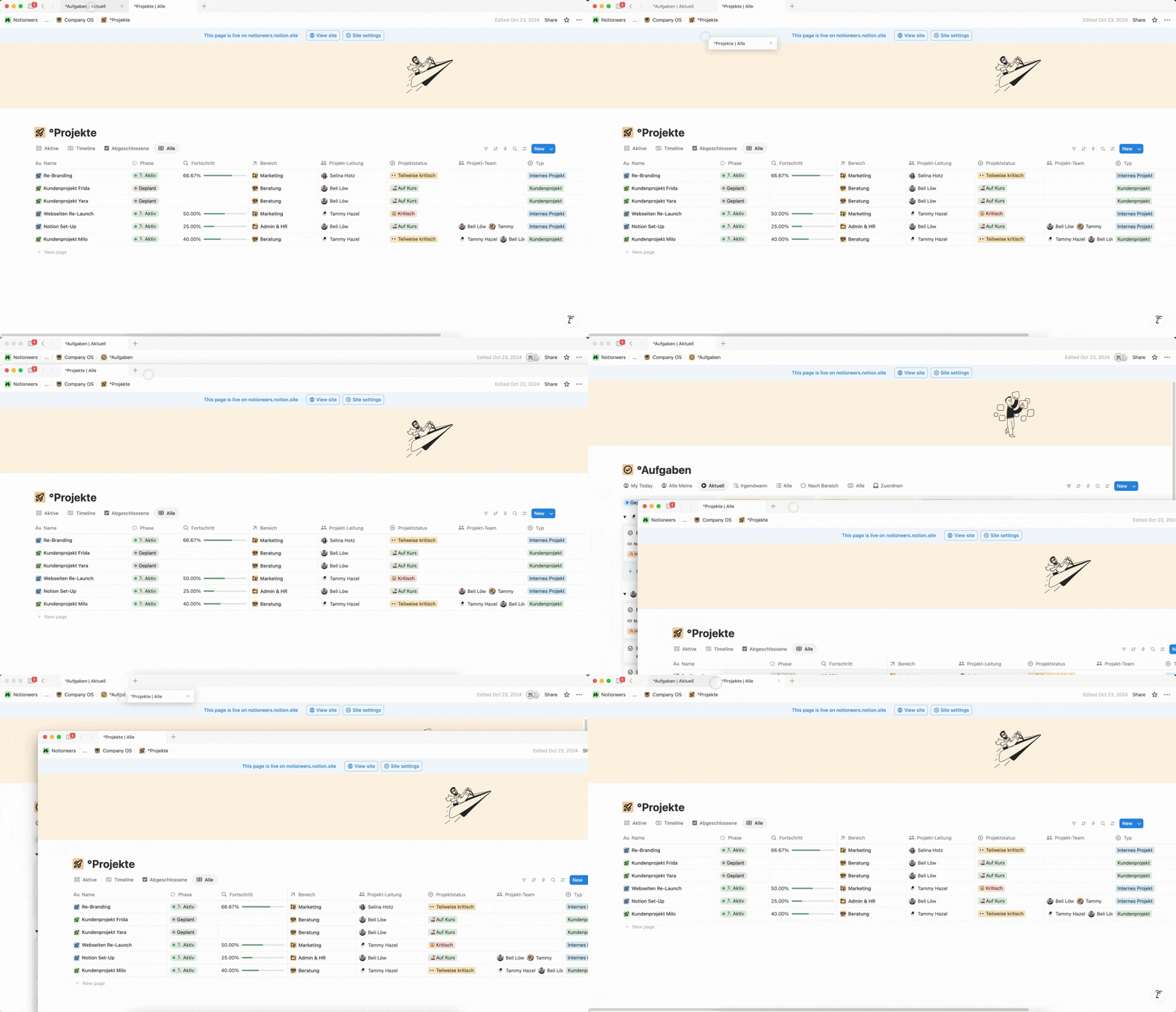
  • Drag and drop windows effortlessly, if you’re using more than one screen this is a very useful tip to help you have a better vision and work on more than one page at a time.
image

Emoji Shortcuts

While typing, you can easily add emojis using : + the emoji name (e.g., :apple for 🍎 or :clapping for 👏).

Notioneers Tip:

Our favorite emoji shortcut (works in most other applications too):

  • Mac: ctrl + cmd + space
  • Windows: Windows key + .

There are countless other shortcuts to make your Notion workflow easier. You can find more on the Notion help page.

FAQ

‣
What's the shortcut for emojis in Notion?
‣
What's the shortcut for toggle in Notion?
‣
What's the Shortcut for Back in Notion?
‣
What's the Shortcut for a new Window in Notion?
‣
How do I quickly format text in Notion?
‣
What's the fastest way to navigate through Notion?
‣
How do I work efficiently with blocks in Notion?
‣
What shortcuts help with database management?
image

Beli Löw

Founder, Senior Notion Consultant

Beli is an IT project manager, tool enthusiast, entrepreneur and has organized his whole life with Notion. His news sources are release notes from tools. There is (almost) no feature or shortcut that he does not know.

icon
FOLLOW ON LINKEDIN FOR UPDATES
image

Level Up Your Business Workspace: Get Monthly Notion Pro Tips

Keep Reading…

Notion AI Agent: A Game Changer for Your Daily WorkNotion AI Agent: A Game Changer for Your Daily Work
Notion AI Agent: A Game Changer for Your Daily Work
3 min
September 16, 2025
Calculate Age in Your Database EasilyCalculate Age in Your Database Easily
Calculate Age in Your Database Easily
3 min
August 20, 2025
Create Ratings in Notion: Prioritize Ideas EasilyCreate Ratings in Notion: Prioritize Ideas Easily
Create Ratings in Notion: Prioritize Ideas Easily
4 min
July 18, 2025
Best Notion Shortcuts Best Notion Shortcuts
Best Notion Shortcuts
6 min
April 20, 2025
Best Notion Templates for Business in 2025Best Notion Templates for Business in 2025
Best Notion Templates for Business in 2025
4 min
April 10, 2025
Invite Guests to Notion: Step by stepInvite Guests to Notion: Step by step
Invite Guests to Notion: Step by step
4 min
March 21, 2025
Find your Notion Invoice EasilyFind your Notion Invoice Easily
Find your Notion Invoice Easily
2 min
March 7, 2025
Resize Images in Notion for Perfect AlignmentResize Images in Notion for Perfect Alignment
Resize Images in Notion for Perfect Alignment
2 min
February 27, 2025
Get Insights with Notion ChartsGet Insights with Notion Charts
Get Insights with Notion Charts
4 min
February 20, 2025
AI SEO Strategies for Notion UsersAI SEO Strategies for Notion Users
AI SEO Strategies for Notion Users
4 min
February 13, 2025
Time to Decimal Conversion with Notion FormulaTime to Decimal Conversion with Notion Formula
Time to Decimal Conversion with Notion Formula
3 min
February 3, 2025
Create Columns in Notion: 5 Easy Methods for Better OrganizationCreate Columns in Notion: 5 Easy Methods for Better Organization
Create Columns in Notion: 5 Easy Methods for Better Organization
4 min
January 3, 2025
Save Charts as PNGSave Charts as PNG
Save Charts as PNG
2 min
November 20, 2024
How do I make my Notion BeautifulHow do I make my Notion Beautiful
How do I make my Notion Beautiful
6 min
September 11, 2024
Share your Schedule and Availability with Notion CalendarShare your Schedule and Availability with Notion Calendar
Share your Schedule and Availability with Notion Calendar
4 min
August 19, 2024
How to Create a Progress BarHow to Create a Progress Bar
How to Create a Progress Bar
3 min
July 30, 2024
How to: Suggested EditsHow to: Suggested Edits
How to: Suggested Edits
3 min
July 23, 2024
Mastering List Management in NotionMastering List Management in Notion
Mastering List Management in Notion
3 min
July 23, 2024
Notion Charts are coming soon 🤫Notion Charts are coming soon 🤫
Notion Charts are coming soon 🤫
2 min
July 23, 2024
Publish Your Notion Website in Under 5 MinutesPublish Your Notion Website in Under 5 Minutes
Publish Your Notion Website in Under 5 Minutes
3 min
July 22, 2024
How to Search and Replace in NotionHow to Search and Replace in Notion
How to Search and Replace in Notion
2 min
July 22, 2024
How to Add Description for Select and Status PropertyHow to Add Description for Select and Status Property
How to Add Description for Select and Status Property
3 min
July 19, 2024
Open a New Window and Tab in NotionOpen a New Window and Tab in Notion
Open a New Window and Tab in Notion
2 min
July 19, 2024
How to Easily Add a Block on TopHow to Easily Add a Block on Top
How to Easily Add a Block on Top
2 min
July 19, 2024
Reduce a column width to the minimumReduce a column width to the minimum
Reduce a column width to the minimum
2 min
July 15, 2024
How to Edit a Database TemplateHow to Edit a Database Template
How to Edit a Database Template
2 min
July 4, 2024
Notion ColorsNotion Colors
Notion Colors
2 min
March 27, 2024
Checkin Method [including Checkin questions generator]Checkin Method [including Checkin questions generator]
Checkin Method [including Checkin questions generator]
4 min
March 26, 2024
Best free Notion templates for individuals in 2025Best free Notion templates for individuals in 2025
Best free Notion templates for individuals in 2025
4 min
January 9, 2024
Second Brain - Organize your digital life with NotionSecond Brain - Organize your digital life with Notion
Second Brain - Organize your digital life with Notion
8 min
October 30, 2023
Fix Table ColumnsFix Table Columns
Fix Table Columns
2 min
August 29, 2023
Formula: RoundFormula: Round
Formula: Round
2 min
July 13, 2023
Show details of Linked EntryShow details of Linked Entry
Show details of Linked Entry
2 min
May 6, 2023
Weekly View in CalendarWeekly View in Calendar
Weekly View in Calendar
2 min
May 2, 2023
Formula: Count RelationsFormula: Count Relations
Formula: Count Relations
2 min
May 1, 2023
A guide to create Notion formulas based on Select fieldsA guide to
A guide to create Notion formulas based on Select fields
8 min
April 20, 2023
Bulk Edit for IconsBulk Edit for Icons
Bulk Edit for Icons
2 min
April 18, 2023
Notion Icons Bulk EditingNotion Icons Bulk Editing
Notion Icons Bulk Editing
2 min
April 18, 2023
February Notion UpdateFebruary
February Notion Update
3 min
February 28, 2023
6-minutes journal - Why you should write one (with free template)6-minutes journal - Why you should write one (with free template)
6-minutes journal - Why you should write one (with free template)
8 min
February 1, 2023
December Notion UpdatesDecember Notion Updates
December Notion Updates
3 min
December 16, 2022
The New Recurring Task Feature in Notion - How to Set it upThe New Recurring Task Feature in Notion - How to Set it up
The New Recurring Task Feature in Notion - How to Set it up
4 min
November 25, 2022
Custom Icons for Database Views and PropertiesCustom Icons for Database Views and Properties
Custom Icons for Database Views and Properties
2 min
November 18, 2022
Notion Web Clipper: What is it and How to use itNotion Web Clipper: What is it and How to use it
Notion Web Clipper: What is it and How to use it
6 min
October 25, 2022
Bending the Notion Learning CurveBending the Notion Learning Curve
Bending the Notion Learning Curve
4 min
October 19, 2022
5 Tips for Notion Newbies5 Tips for Notion Newbies
5 Tips for Notion Newbies
4 min
September 20, 2022
Edit multiple database entriesEdit multiple database entries
Edit multiple database entries
2 min
February 2, 2022
Notion Templates Simply ExplainedNotion Templates Simply Explained
Notion Templates Simply Explained
4 min
October 13, 2021
Achieving Goals with OKRsAchieving Goals with OKRs
Achieving Goals with OKRs
3 min
June 18, 2021
Set Notification Reminders on Date Properties | NotioneersSet Notification Reminders on Date Properties | Notioneers
Set Notification Reminders on Date Properties | Notioneers
2 min
Logo

About

Team

Contact

DE 🇩🇪