Logo
  • Solutions
  • Team
  • Resources
ERSTGESPRÄCH
How do I make my Notion Beautiful

How do I make my Notion Beautiful

Lecture
6 min
Author

Beli Löw

Published:
September 11, 2024
Updated:
December 26, 2024

← All Articles

image

The Art of Notion Aesthetics

Hey there! Notion isn't just about getting things done—it's also about making your workspace look awesome. A beautiful Notion setup can boost your creativity and make organizing fun.

In this guide, we'll show you how to create an eye-catching Notion workspace, no matter your skill level. We'll cover cool tricks with icons, covers, blocks, and columns to transform your digital space into something you'll love using.

Ready to dive in? Let's make your Notion both super organized and visually stunning!

  • The Art of Notion Aesthetics
  • 1. Noticons for Notion: The Top Choice for Aesthetic and Functional Icons
  • 2. Notion Blocks Explained: Create, Customize, and Organize Your Content:
  • 3. Make Information Pop in Notion with Styled Callouts:
  • 4. Organize Notion Pages with Columns for a Professional Look:
  • 5. Add Interactive Buttons in Notion to Simplify and Beautify Your Pages:
  • 6. Organize Your Notion Pages Visually Using Toggles and Nested Content:
  • 7. Make Your Notion Pages Stand Out with Stunning Icon Designs:
  • 8. How to Use Images in Notion to Create Visually Appealing Pages:
  • 9. Make Your Notion Databases Visually Appealing and Easy to Use:
  • 10. Use Code Format in Notion to Display Snippets with Style and Clarity:

1. Noticons for Notion: The Top Choice for Aesthetic and Functional Icons

Have you heard about Noticons? If not, you're missing out! 😅 Don't worry, though—we're here to help you elevate your Notion pages. With Noticons created by Notioneers, you can find icons, cover images, and cards to style up your Notion space.

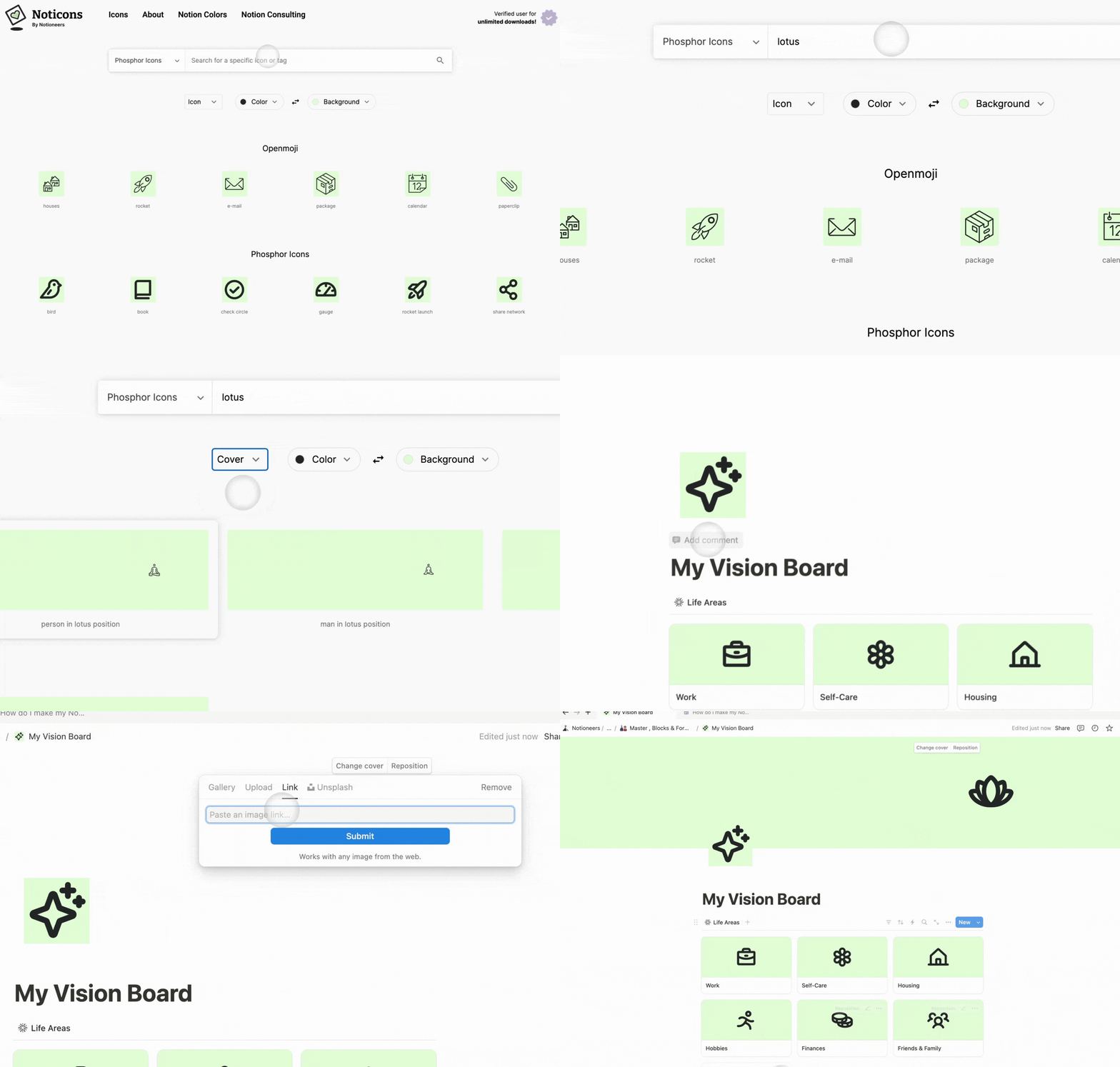
How to use Noticons:

  1. Go to our Noticons website—the best part? It's totally free! https://www.noticons.com/
  2. Search for the perfect card, icon, cover and color to style your template.
  3. Copy the link by simply clicking on it.
  4. Paste the link and that's it—easy, fun, and aesthetic!
  5. image

2. Notion Blocks Explained: Create, Customize, and Organize Your Content:

They're super versatile, holding everything from text and images to lists and tables. You can easily move them around and customize them.

Here you can see the different sizes of headings, text and colored text you can play around with.
  • Tables: the easy way to organize information—don't make them plain and boring! Add some color to make them visually appealing.
image
  • Quotes: These help emphasize important text or inspirational messages. You can style quotes with different formats, colors, and sizes to create appealing highlights.
image

3. Make Information Pop in Notion with Styled Callouts:

These blocks are perfect for highlighting key info or adding a visual pop to your content. They usually come with an icon, a cool background color, and some text. Use them to make important points stand out, flag warnings, or share quick tips that your readers shouldn't miss.

image
image
image

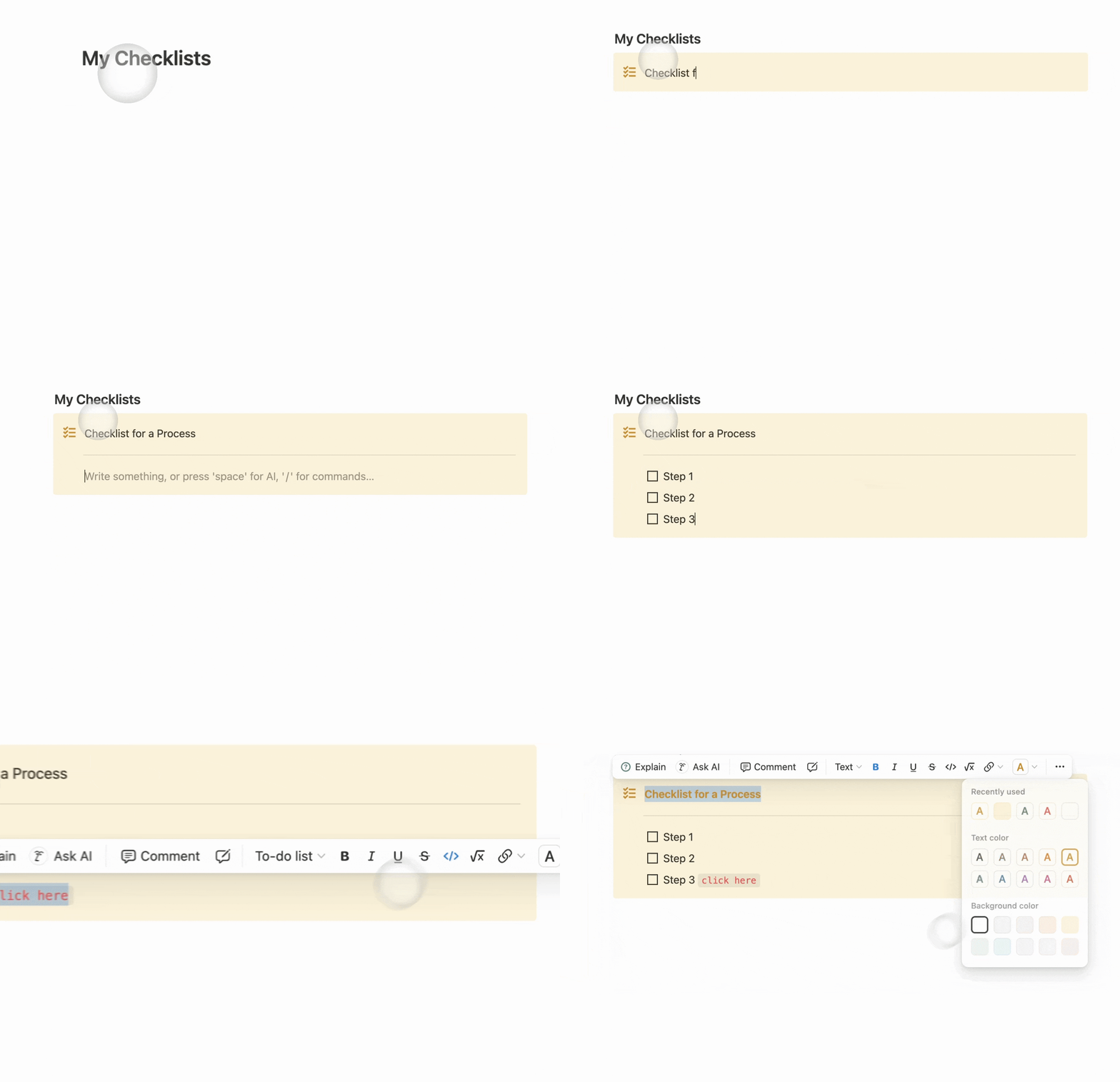
Here you have some examples, make them colorfull, with or without icons and even add columns inside! 🤩

How to create a pretty Callout:
image

4. Organize Notion Pages with Columns for a Professional Look:

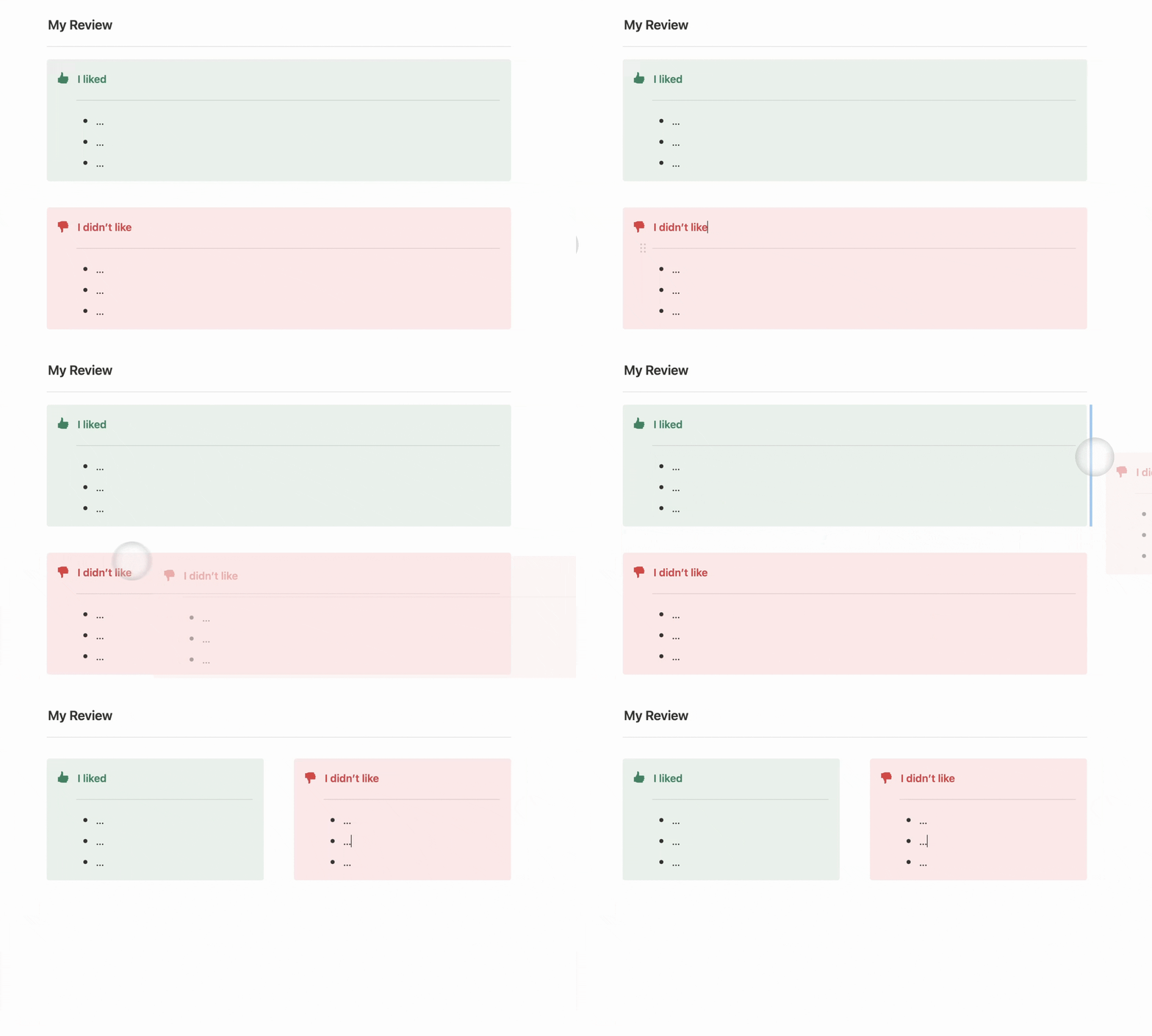
Perfect for comparing data, organizing info horizontally, and adding visual flair to your Notion setup.

image
Notioneers Tip:
Create columns by dragging a block and dropping it to the right of another block. Look for the vertical blue line to appear, indicating where the new column will be placed- quick and easy!
Create columns by dragging a block and dropping it to the right of another block. Look for the vertical blue line to appear, indicating where the new column will be placed- quick and easy! 😜

5. Add Interactive Buttons in Notion to Simplify and Beautify Your Pages:

We love buttons because they're functional and save us time. But remember, they don't have to be just black and white! Play around and add some color, emojis, or whatever matches your style!

Why making them plain and boring, when you have the option of color and emojis!

6. Organize Your Notion Pages Visually Using Toggles and Nested Content:

Toggles are a samrt wat to organize your content hink of.Just click to expand and see what's inside, click again to tuck it away. Perfect for keeping your workspace clean and professional without sacrificing accessibility!

These are the different types of toggles you can add.
You can also add toggles with the different size of headings.

7. Make Your Notion Pages Stand Out with Stunning Icon Designs:

We'll show you three different ways to style your page icons—it's quick and easy to add your personal touch.

image
Notioneers Tip:
  1. Go to our Noticons website.
  2. Search for the perfect icon, we have thounsand of options and colors.
  3. Click on the icon to copy the link and go to your Notion page.
  4. Click on add icon and select upload
  5. Paste the link and that’s it! 🥳

8. How to Use Images in Notion to Create Visually Appealing Pages:

Images are very versatile in Notion. You can create beautiful mosaics, add them to gallery views and databases, and the best part is that you can place them wherever you want—they're easy to move around and resize.

Here’s one of the many ways yopu can use images in Notion.
Here’s one of the many ways yopu can use images in Notion. 🥳

9. Make Your Notion Databases Visually Appealing and Easy to Use:

Databases are the best way to collect and organize information. They can be displayed as boards, tables, calendars, lists, galleries—the options are endless! Are you wondering if they can be stylish? Of course they can! In this article, we explain how to add emojis anywhere, including to your select properties.

Another appealling way to style your databases
Another appealling way to style your databases 🤩
This is gallery view
This is gallery view 🙂‍↕️

How to add a Card Image:

  1. Go to our Noticons website.
  2. Search for the perfect card, we have thounsand of options and colors.
  3. Click on the icon to copy the link and go to your Notion page.
  4. Create a File & Media property.
  5. Set the galery view to use File & Media property as a preview image inted of “show page content”.
  6. Paste the link and that’s it! 🥳
  7. image

Notioneers Tip:

Want to learn how to add description to properties?Here’s a tutorial for you  How to add description to select and status properties. 😌

10. Use Code Format in Notion to Display Snippets with Style and Clarity:

This format creates monospace text, perfect for displaying short code snippets within regular text.

image

How to add Noticons:

  1. Go to our Noticons website.
  2. Search for the perfect card, we have thounsand of options and colors.
  3. Click on the icon to copy the link and go to your Notion page.
  4. Create a File & Media property.
  5. Set the galery view to use File & Media property as a preview image inted of “show page content”.
  6. Paste the link and that’s it! 🥳
  7. image
image

Beli Löw

Founder, Senior Notion Consultant

Beli is an IT project manager, tool enthusiast, entrepreneur and has organized his whole life with Notion. His news sources are release notes from tools. There is (almost) no feature or shortcut that he does not know.

icon
FOLLOW ON LINKEDIN FOR UPDATES
image

Level Up Your Business Workspace: Get Monthly Notion Pro Tips

Keep Reading…

Notion AI Agent: A Game Changer for Your Daily WorkNotion AI Agent: A Game Changer for Your Daily Work
Notion AI Agent: A Game Changer for Your Daily Work
3 min
September 16, 2025
Calculate Age in Your Database EasilyCalculate Age in Your Database Easily
Calculate Age in Your Database Easily
3 min
August 20, 2025
Create Ratings in Notion: Prioritize Ideas EasilyCreate Ratings in Notion: Prioritize Ideas Easily
Create Ratings in Notion: Prioritize Ideas Easily
4 min
July 18, 2025
Best Notion Shortcuts Best Notion Shortcuts
Best Notion Shortcuts
6 min
April 20, 2025
Best Notion Templates for Business in 2025Best Notion Templates for Business in 2025
Best Notion Templates for Business in 2025
4 min
April 10, 2025
Invite Guests to Notion: Step by stepInvite Guests to Notion: Step by step
Invite Guests to Notion: Step by step
4 min
March 21, 2025
Find your Notion Invoice EasilyFind your Notion Invoice Easily
Find your Notion Invoice Easily
2 min
March 7, 2025
Resize Images in Notion for Perfect AlignmentResize Images in Notion for Perfect Alignment
Resize Images in Notion for Perfect Alignment
2 min
February 27, 2025
Get Insights with Notion ChartsGet Insights with Notion Charts
Get Insights with Notion Charts
4 min
February 20, 2025
AI SEO Strategies for Notion UsersAI SEO Strategies for Notion Users
AI SEO Strategies for Notion Users
4 min
February 13, 2025
Time to Decimal Conversion with Notion FormulaTime to Decimal Conversion with Notion Formula
Time to Decimal Conversion with Notion Formula
3 min
February 3, 2025
Create Columns in Notion: 5 Easy Methods for Better OrganizationCreate Columns in Notion: 5 Easy Methods for Better Organization
Create Columns in Notion: 5 Easy Methods for Better Organization
4 min
January 3, 2025
Save Charts as PNGSave Charts as PNG
Save Charts as PNG
2 min
November 20, 2024
How do I make my Notion BeautifulHow do I make my Notion Beautiful
How do I make my Notion Beautiful
6 min
September 11, 2024
Share your Schedule and Availability with Notion CalendarShare your Schedule and Availability with Notion Calendar
Share your Schedule and Availability with Notion Calendar
4 min
August 19, 2024
How to Create a Progress BarHow to Create a Progress Bar
How to Create a Progress Bar
3 min
July 30, 2024
How to: Suggested EditsHow to: Suggested Edits
How to: Suggested Edits
3 min
July 23, 2024
Mastering List Management in NotionMastering List Management in Notion
Mastering List Management in Notion
3 min
July 23, 2024
Notion Charts are coming soon 🤫Notion Charts are coming soon 🤫
Notion Charts are coming soon 🤫
2 min
July 23, 2024
Publish Your Notion Website in Under 5 MinutesPublish Your Notion Website in Under 5 Minutes
Publish Your Notion Website in Under 5 Minutes
3 min
July 22, 2024
How to Search and Replace in NotionHow to Search and Replace in Notion
How to Search and Replace in Notion
2 min
July 22, 2024
How to Add Description for Select and Status PropertyHow to Add Description for Select and Status Property
How to Add Description for Select and Status Property
3 min
July 19, 2024
Open a New Window and Tab in NotionOpen a New Window and Tab in Notion
Open a New Window and Tab in Notion
2 min
July 19, 2024
How to Easily Add a Block on TopHow to Easily Add a Block on Top
How to Easily Add a Block on Top
2 min
July 19, 2024
Reduce a column width to the minimumReduce a column width to the minimum
Reduce a column width to the minimum
2 min
July 15, 2024
How to Edit a Database TemplateHow to Edit a Database Template
How to Edit a Database Template
2 min
July 4, 2024
Notion ColorsNotion Colors
Notion Colors
2 min
March 27, 2024
Checkin Method [including Checkin questions generator]Checkin Method [including Checkin questions generator]
Checkin Method [including Checkin questions generator]
4 min
March 26, 2024
Best free Notion templates for individuals in 2025Best free Notion templates for individuals in 2025
Best free Notion templates for individuals in 2025
4 min
January 9, 2024
Second Brain - Organize your digital life with NotionSecond Brain - Organize your digital life with Notion
Second Brain - Organize your digital life with Notion
8 min
October 30, 2023
Fix Table ColumnsFix Table Columns
Fix Table Columns
2 min
August 29, 2023
Formula: RoundFormula: Round
Formula: Round
2 min
July 13, 2023
Show details of Linked EntryShow details of Linked Entry
Show details of Linked Entry
2 min
May 6, 2023
Weekly View in CalendarWeekly View in Calendar
Weekly View in Calendar
2 min
May 2, 2023
Formula: Count RelationsFormula: Count Relations
Formula: Count Relations
2 min
May 1, 2023
A guide to create Notion formulas based on Select fieldsA guide to
A guide to create Notion formulas based on Select fields
8 min
April 20, 2023
Bulk Edit for IconsBulk Edit for Icons
Bulk Edit for Icons
2 min
April 18, 2023
Notion Icons Bulk EditingNotion Icons Bulk Editing
Notion Icons Bulk Editing
2 min
April 18, 2023
February Notion UpdateFebruary
February Notion Update
3 min
February 28, 2023
6-minutes journal - Why you should write one (with free template)6-minutes journal - Why you should write one (with free template)
6-minutes journal - Why you should write one (with free template)
8 min
February 1, 2023
December Notion UpdatesDecember Notion Updates
December Notion Updates
3 min
December 16, 2022
The New Recurring Task Feature in Notion - How to Set it upThe New Recurring Task Feature in Notion - How to Set it up
The New Recurring Task Feature in Notion - How to Set it up
4 min
November 25, 2022
Custom Icons for Database Views and PropertiesCustom Icons for Database Views and Properties
Custom Icons for Database Views and Properties
2 min
November 18, 2022
Notion Web Clipper: What is it and How to use itNotion Web Clipper: What is it and How to use it
Notion Web Clipper: What is it and How to use it
6 min
October 25, 2022
Bending the Notion Learning CurveBending the Notion Learning Curve
Bending the Notion Learning Curve
4 min
October 19, 2022
5 Tips for Notion Newbies5 Tips for Notion Newbies
5 Tips for Notion Newbies
4 min
September 20, 2022
Edit multiple database entriesEdit multiple database entries
Edit multiple database entries
2 min
February 2, 2022
Notion Templates Simply ExplainedNotion Templates Simply Explained
Notion Templates Simply Explained
4 min
October 13, 2021
Achieving Goals with OKRsAchieving Goals with OKRs
Achieving Goals with OKRs
3 min
June 18, 2021
Set Notification Reminders on Date Properties | NotioneersSet Notification Reminders on Date Properties | Notioneers
Set Notification Reminders on Date Properties | Notioneers
2 min
Logo

About

Team

Contact

DE 🇩🇪