Beli Löw

Have you ever wondered how some people can hold so much knowledge in their heads? Their ability to wield ideas, thoughts, and memories with exceptional productivity isn't solely due to inherent talent. Instead, it often boils down to employing a systematic approach for structuring and organizing their wealth of information.
- The Genesis of the Second Brain
- What is a Second Brain?
- Process your information with the CODE method
- 1. Collect: Seize Lightning in a Bottle!
- 2. Organize: Using P.A.R.A., Your Symphony of Order
- Actionability → Projects lead the charge, Archives rest in tranquillity.
- The Cathedral Effect
- 3. Distil
- 4. Express: Power Up, Take Action!
- Personal Journey - How I use my second brain
- Achieving tasks and goals
- How can I use my own Second Brain?
- Second Brain as an enterprise tool
- Conclusion
- Second Brain is a digital system that allows you to collect, organize, and use information to improve daily life and work.
- Life OS is a term often used in the context of the idea of the "Second Brain" and Notion. It is another term, meaning the same thing. A digital system to organize yourself.
- CODE stands for Capture, Organize, Distill, and Express and is a method for better processing information in your Second Brain.
- P.A.R.A. stands for Projects, Areas, Resources, and Archives and is a method for better organizing digital data.
The Genesis of the Second Brain
Imagine Tiago Forte as the architect behind the paradigm shift—a productivity virtuoso striving to rescue individuals from the chaos of data overwhelm. His brainchild? The Second Brain, CODE, and P.A.R.A.—ingenious systems designed to streamline thoughts and ideas.
Notion emerged as the playground where these groundbreaking frameworks flourished. Consequently, a plethora of templates and adaptations of the Second Brain method emerged within the Notion ecosystem. One of the key figures contributing to its popularization is Ali Abdal, a revered productivity advocate. He championed the Second Brain within Notion, amplifying its impact in the productivity landscape., actively utilizing the Second Brain concept in his practices and teachings.
What is a Second Brain?
Your Second Brain isn't a sci-fi implant; it's an ally—a systematic approach to externalize information, enhance memory retention, and elevate problem-solving skills. It shields vital ideas from forgetfulness, liberating precious mental space for more data processing.
The concept of a second brain operates by optimizing cognitive potential through information outsourcing. By externalizing information, this methodology boosts memory performance and sharpens problem-solving skills. Vital information and ideas are safeguarded against forgetfulness, facilitating streamlined thought organization and freeing up mental space for processing more information.
A second brain offers a variety of benefits that can significantly elevate cognitive abilities and productivity:
- Memory Mastery: Externalize information for effortless recall.
- Problem-Solving Edge: Connect information dots, solve challenges adeptly!
- Creative Ignition: Link ideas, spark creativity!
- Zen-like Organization: Retrieve information seamlessly.
- Efficiency Overhaul: Command time, bolster productivity.
Process your information with the CODE method
Tiago Forte's blueprint for information domination—here are the 4 Steps to Information Nirvana, which he describes in his book “Building Your Second Brain”.
🔎 CODE System Decoded:
1. Collect: Seize Lightning in a Bottle!
When you have an idea or come across a piece of information that you want to remember, it's important to capture it. Snatch screenshots, bookmark insights, voice-record brainwaves! Capture information gems without disrupting your flow. The key? Swift capture, systematic sorting later.
Imagine having all your research materials for a groundbreaking project neatly gathered in one digital hub. From articles and videos to images and notes, the CODE system encourages you to collect all the crucial information that sparks your creativity and fuels your projects.
So, you might be thinking, 'Hold on a sec—I already do this. But a second brain? Not quite feeling that vibe.' Here's the scoop—chances are, you're unintentionally missing the mark in a couple of ways.
Firstly, it's all about capturing the right stuff. We tend to hoard information simply because we think we should, even if it doesn't speak to us. Result? A mountain of data that's, well, overwhelming. The trick? Capture info that sets your mind on fire. Think of these nuggets as more than facts—they're like treasures, holding solutions, time-saving hacks, bursts of inspiration, or even game-changing perspectives.
Secondly, it might be a scattergun approach. Sure, there's a heap of digital tools to gather knowledge—bookmarking, highlighting, or snipping audio clips—but that's just it. The catch lies in bringing all these disparate pieces together. Visualize these tools as nerve endings; they should all lead back to one central hub: your Second Brain. Any standard digital notes app suffices; configure all your capture methods to feed into this single digital repository automatically.
Feeling like you're drowning in info? Take a leaf from Nobel Prize winner Richard Feynman, he was considered an outside-the-box thinker. Feynman kept a shortlist of core questions that guided his research. When encountering new information, he’d test it against these questions, often uncovering unexpected solutions. Crafting your own set of core questions sharpens your focus while amassing a diverse knowledge library.
Eager to dive into your personal capturing journey? Here's your bonus challenge:
Every capture should feel like a bolt of lightning—potent and urgent. Tiago Forte, averages just two captures a day. Think back over your last 24 hours. What are the two game-changers you've picked up? Grab 'em quick!
2. Organize: Using P.A.R.A., Your Symphony of Order
Now that you've got all your gems in one place, it's time to bring order to the chaos. Organize these materials into a cohesive structure, ensuring easy access to exactly what you need when you need it. The P.A.R.A. method is an effective way to organize and manage digital data. By dividing it into:
Personal
- Home Renovations
- Planning a Holiday
Professional
- Client project
- Website relaunch
Projects are short-term objectives, usually with a deadline, that you are actively working toward completing.
Personal
- Product Comparisation
- List of places to go
Professional
- Briefing for website
- Marketing strategy
In Resources, include all the necessary materials for the renovation, such as furniture store links, design inspiration, paint swatches, and contractor contact information.
Personal
- Housing
- Travel
Professional
- Field: Marketing
- Field: Admin & HR
Areas are ongoing commitments. Your Housing, for example, is an area, not a project. They don’t have a delivery date. They’re dynamic and need consistent oversight.
Personal
- Project: Home Renovation
- Your holiday research
Professional
- Project: Notion consultation
- Keyword Research
Think of Archives as your digital attic. Old projects, completed tasks, or reference materials can be neatly stored here, keeping your active workspace clutter-free while still retaining easy access to past information when needed.
Actionability → Projects lead the charge, Archives rest in tranquillity.
Within the organizational framework of Notion, information isn't merely stored; it's categorized based on its potential for action. The system is designed to prioritize actionable items, starting with projects—those tasks and endeavors that demand immediate attention and execution. As the hierarchy descends to areas, resources, and archives, a clear distinction emerges, signifying the level of actionability associated with each category.
This emphasis on actionability not only streamlines workflow but also propels productivity by directing focus toward tasks and information that necessitate immediate action or engagement. By integrating this principle into your Second Brain structure, you not only organize data but also instill a proactive approach, ensuring that your efforts align with your goals and priorities.

The Cathedral Effect
Your environment shapes your thoughts. It's easier to ponder life's profound questions amidst the soaring gothic arches and marble floors of a cathedral than amidst the humdrum of a dentist's waiting room. Likewise, finding focus in a minimalistic studio versus a cluttered space is a given.
This phenomenon extends into our digital realm. Consider the knowledge assets you've amassed as the cornerstone of your second brain.
But here's the catch: capturing without order? It's akin to drowning brilliance in chaos. Suddenly, those invaluable insights lose their glaze amid the information overload. And this time the person responsible for that overload is you!
Feeling up for a challenge? Here’s your task: Streamline your digital abode. Archive everything: yes, everything. Rummaging through digital relics resembles scaling Everest—an impediment to erecting an efficient Second Brain. Once you've achieved pristine digital clarity, take a mental inventory. What projects demand your attention now? Pick a couple—perhaps two or three—and allocate them their rightful folders. Voilà! You've set the stage for constructing your digital cathedral.
3. Distil
Here is where we summarize the key insights from your research materials, allowing you to focus on the most important and relevant information for your project. Condense knowledge into a potent essence! Summarize for rapid recall. Essence, not essays, is your elixir!
This is how your distillation might look like in action.
- First, you save an article that sparks your interest.
- Second, you read through it and highlight key passages.
- Third, you bold key ideas and phrases within those passages.
- Fourth, you write an executive summary of those key ideas – no more than a few sentences.
4. Express: Power Up, Take Action!
The final step is to put the knowledge we have collected, organized, and distilled into action. Infuse projects with distilled wisdom, create new tasks, or clean up the archives attic. Small steps yield big wins. Break the mountain, savour the progress.
Initiate your projects by breaking them into manageable chunks known as intermediate packets. But what exactly are these? They represent actionable segments within a larger process.
They’re like Lego blocks; the more pieces at your disposal, the grander and more intricate your constructions can be. Similarly, by dissecting complex projects into achievable steps, you pave the way for colossal achievements.
This approach isn't novel; numerous professions adopt it—software developers work in modules, while TV producers create pilots before committing to complete seasons.
Furthermore, once you've crafted an intermediate packet—be it a meeting agenda or a mission statement—it can serve repeatedly. Repurpose and modify these packets to align with your ongoing projects. After consistent use of your second brain, you likely possess an array of pre-built intermediate packets.
Leverage the tagging function and search bar to unearth these packets efficiently. Tagging captured knowledge with pertinent keywords enables swift retrieval later—a step you'll appreciate.
Engaging in expression is incentivized by the words of the 18th-century philosopher Giambattista Vico: verum ipsum factum—Latin for "we only know what we make." True understanding emerges when knowledge is put into practice. Utilizing gathered insights to create something new signifies expertise attainment.
Personal Journey - How I use my second brain
As a certified Notion consultant, Notion isn't just a tool; it's my North Star. Organized structure? Absolutely indispensable!I use Notion in my business as well as personally. Both areas have a similar set-up. It is important to me to have a consistent, and easy to understand layout.
2018 marked the start of my Notion odyssey:

2023: Witness my blossoming Second Brain!
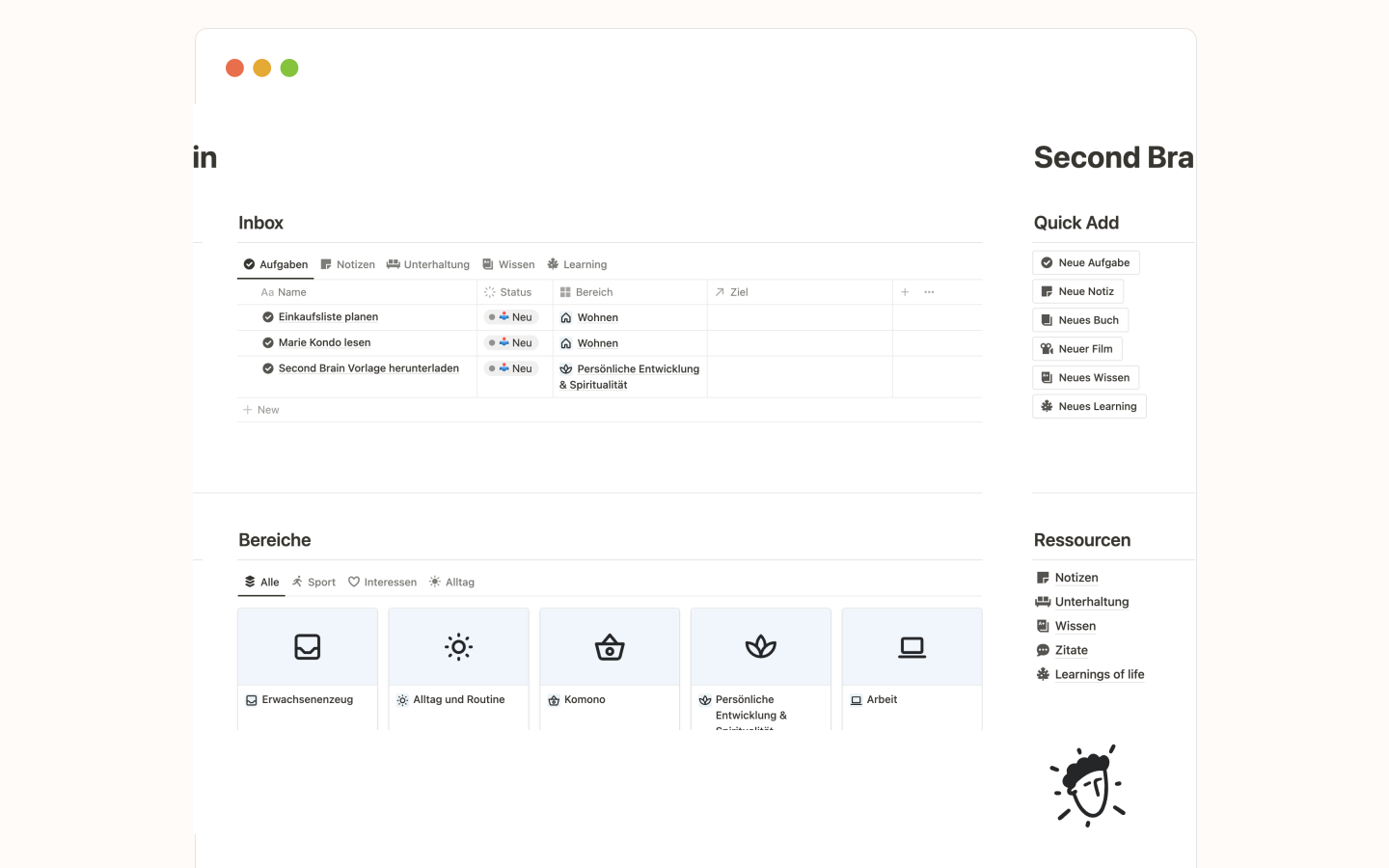
Truth be told, I'm not a human encyclopedia, when I read an article or watch a video on a topic, I often forget the content after half a year. But I have a trick—I document the essence pronto! Watched a video? Summarize, capture wisdom, retain brainpower! I can always look it up again and have the most important information immediately available.
My real life example: I watch a half-hour video on watering my houseplants. It contains a lot of significant information and learnings. If I need this information a few months later, I would need to watch the whole video again. Therefore, I write myself a short summary right away each time. My Second Brain is always open next to the video, so I can capture the most indispensable things.
Remember, Distilling takes time. But I promise, it saves you far more time than it takes up. Next time you engage with your captured knowledge, you won’t have to go back through everything to remember why it’s relevant. And you can choose the level you engage at – skim the summary, refresh the key ideas you’ve highlighted, or go through the content again.
Achieving tasks and goals

Example of one of my goals with measurability and tasks.
Goals have a remarkable ability to inspire and drive us towards success! Instead of simply stating “Furnishing my flat” which can sound mundane, a more captivating goal like “I feel great in my apartment” can ignite a sense of excitement and motivation. Personally, I find it much more motivating to read the feeling that I would feel when achieving the project, rather than just knowing the name of its purpose.
To make goals truly effective, they should have measurable magic. By breaking down these goals into specific and realistic tasks, they become like dedicated foot soldiers working towards the desired outcome.
How can I use my own Second Brain?
Snag a Notion Second Brain template or craft your digital sidekick. Ready-made or handcrafted, the power lies within!

Second Brain as an enterprise tool
At the heart of our consulting projects, content creation hub and company wiki, Company OS stands tall as our cornerstone repository.
Reflecting the essence of the Second Brain methodology, our system comprises integral components: projects, resources, sections, and a meticulously curated archive. This structure caters precisely to our multifaceted operational requisites.
OS stands for Operating System. This isn't just a product of five years; it's a saga of trials, errors, and triumphant optimizations. It's a testament to our dedication. Thoroughly vetted, rigorously tested, and impeccably fine-tuned through internal iterations, our Company OS symbolizes the pinnacle of efficiency and operational seamlessness.

Screenshot of our Notion Template Company OS
Conclusion
Your personal Second Brain isn't just a work asset; it's a life-enhancing companion! Notion is your toolkit, CODE and P.A.R.A., your strategies. Forge ahead—master the chaos, own the data, and conquer your world!

Beli Löw
Founder, Senior Notion Consultant
Beli is an IT project manager, tool enthusiast, entrepreneur and has organized his whole life with Notion. His news sources are release notes from tools. There is (almost) no feature or shortcut that he does not know.


Level Up Your Business Workspace: Get Monthly Notion Pro Tips
Keep Reading…


